Skip to content
Blog

Nomen is out

Nomen 1.0 is out, and you can buy it today.

If you haven’t been following along, Nomen is a plug-in for Lightroom Classic that names the wildlife and plants in your photos. You select some photos, run it, and it suggests a species for each one. You look over what it found and keep the ones you agree with. The names go straight into your catalog as keywords, with a caption ready to post.

Nomen overview (1:06). Plays from YouTube when you press play. What YouTube receives
Transcript

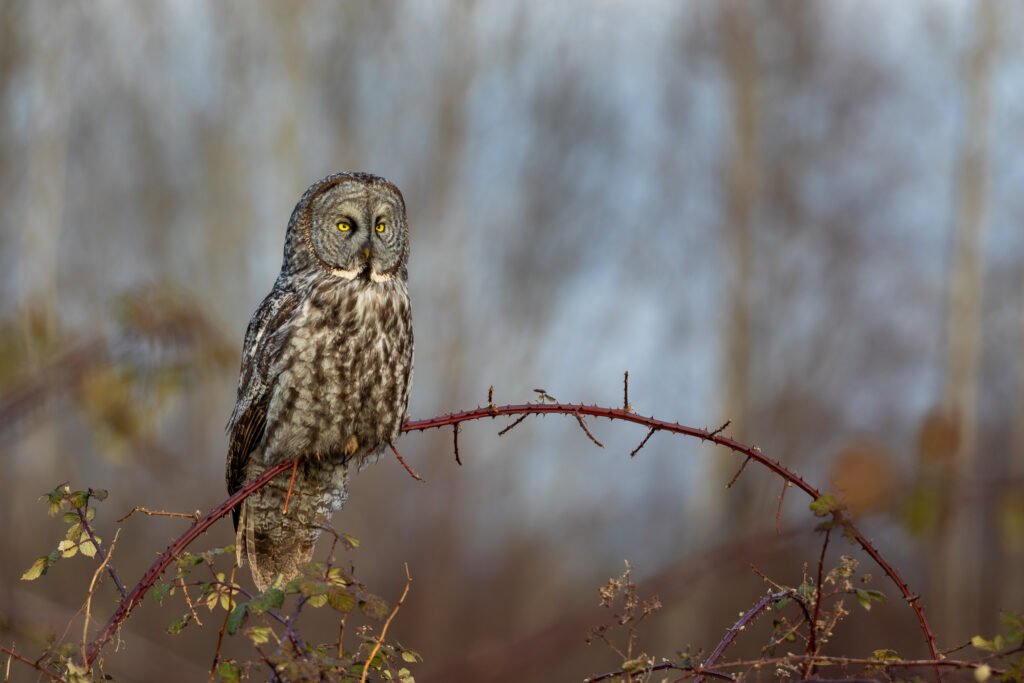
Nomen brings species matching into Lightroom Classic. Start by selecting a photograph in the Library. Click the Library menu, go to Plug-in Extras, and choose Run Nomen on Selected Photos. On the Species tab, select the groups you want to search. For this owl, we use Birds. For a photograph without GPS, choose a country on the Location tab to narrow the search. This photograph was shot in Canada. On Scan options, choose a matching type. Main subject matches the largest or most prominent subject. Choose Full review to inspect the result, then click Run Nomen.

Nomen suggests a species and draws a box around the subject it matched. This owl has a Clear match. Look at the alternatives before deciding what to keep. When you apply a match, the species names are saved as keywords, so you can search by common or scientific name. Nomen can also generate a caption, ready to share. Applying a match saves a caption in Lightroom's Metadata panel and replaces any caption already there. Your photographs and their species details stay together in your Lightroom catalog.

What it does

It knows more than 1.3 million species across 63 groups, on land and in the water: birds, mammals, insects, plants, fungi, fish, corals, nudibranchs and a lot more.

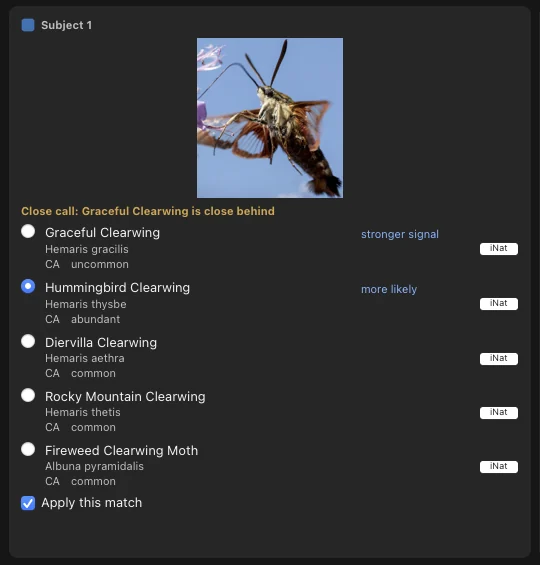
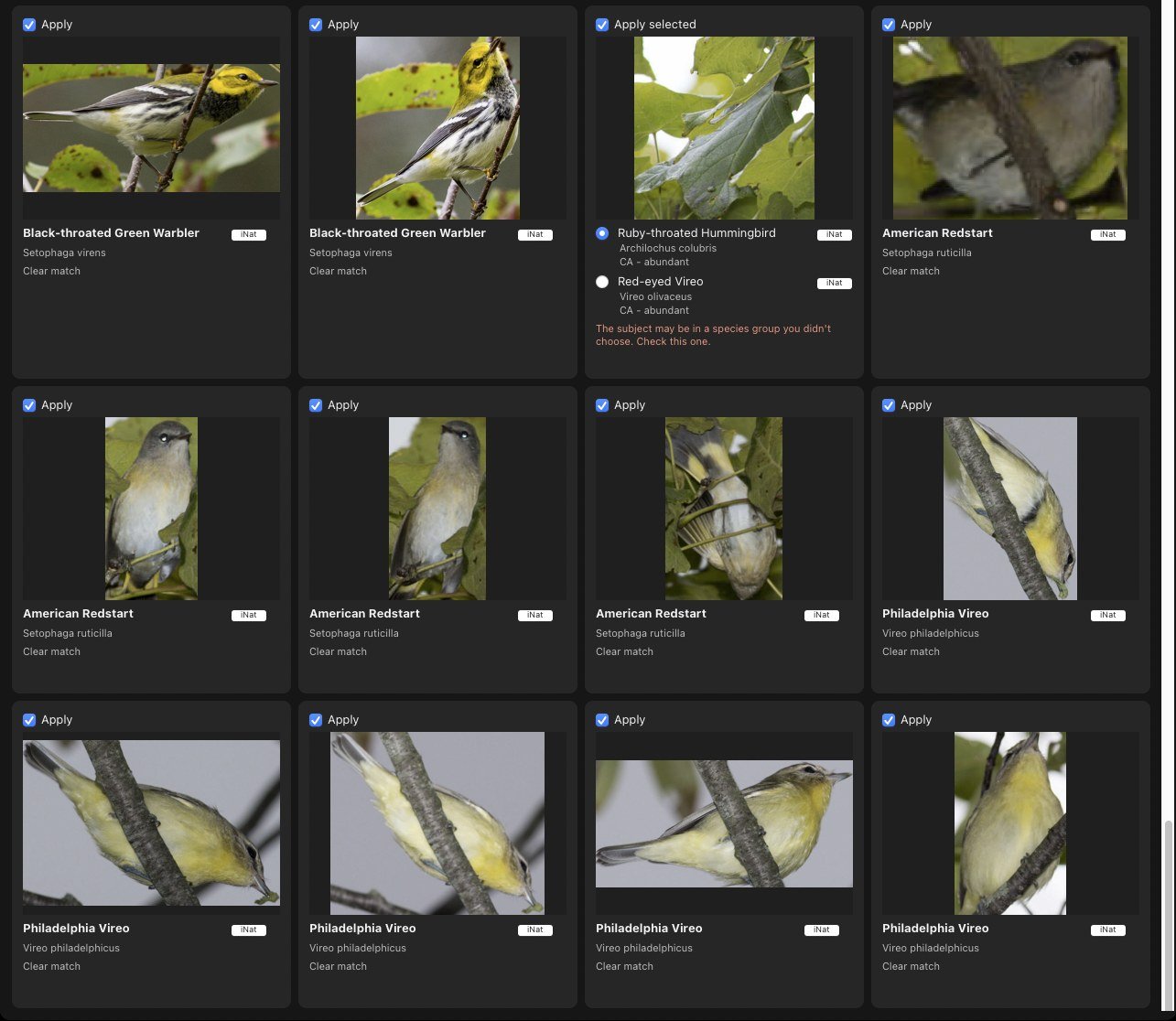
Every match tells you how sure it is, in words instead of a percentage. Clear match means nothing else came close. Close call names the species right behind it. Check this one means have a look yourself. You see the top five suggestions for each photo, and each one links to iNaturalist so you can check it.
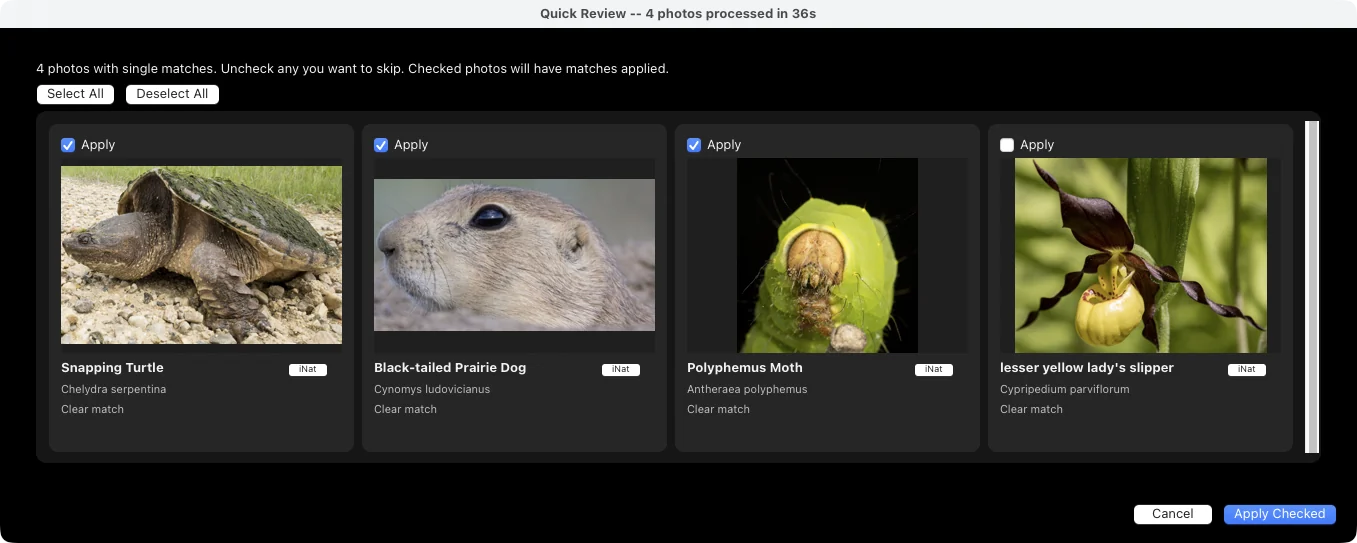
If you read the Redstart post, you’ve seen what it can turn up in a folder you thought was finished. It’s just as useful on the folders you never got around to naming at all. I have plenty of both.

It works the way you shoot

  • Main subject for one animal in the frame, Every subject when there’s more going on, and survey modes for counting a flock.
  • If Nomen picks the wrong subject, you can point it at another box in Full review or draw your own.
  • It reads the country from your photos’ GPS, or you pick it, and ranks species by what’s been recorded there. A bird you shot in Costa Rica won’t come back as a look-alike that only lives in Southeast Asia.
  • Leave out people keeps divers and bystanders out of the matches.
What ends up in your catalog

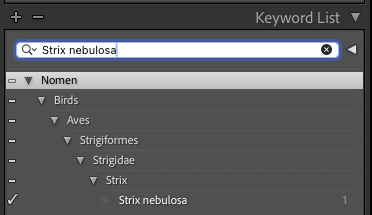
Nomen writes the names you accept as keywords, in a proper hierarchy: common names, and the full taxonomy if you want it. It can also write a caption with the species, your camera settings and hashtags, ready to paste into a post. Every change goes through Lightroom’s own undo.
Your photos stay on your computer

Everything runs on your computer. Nomen never uploads a photo, and matching works without an internet connection, so it still works on a boat or at a field station.

Nomen checks your license when it’s online and keeps working for 60 days after the last check. If the license server is ever retired, a final update removes the check, so the version you paid for keeps working.

Price

Individual is $59 USD for the first 100 buyers, then $79. It covers one person on up to two computers. Team is $199 USD for three named people, each with their own key. If you need more than that, email me and we’ll work something out.

You pay once. There’s no subscription, and every update within version 1 is free. Prices are plus applicable taxes, and there’s a 14-day money-back guarantee, so if it doesn’t work for you, you get a full refund.

If you’re in the UK or the Isle of Man, I’m still finishing UK VAT registration, so checkout can’t take addresses there yet. It’s coming soon.

What you need

  • Lightroom Classic 13 or later.
  • An Apple Silicon Mac with macOS 14 or later, or Windows 10 (22H2) or 11, 64-bit. Intel Macs aren’t supported.
  • About 6 to 7 GB of space for the matching engine and species data, downloaded once.

If you tested the beta

Thank you. A lot of what’s in 1.0 is there because of your reports, your photos and your patience with my early builds.

To update on 0.14.2 or later, open File > Plug-in Manager > Nomen and press Update plugin. On anything older, download Nomen.zip and replace the whole Nomen.lrplugin folder once. Then press Update assets. The species data downloads once more, about 4.5 GB, because it now comes from Nomen’s own servers.

If you have a beta license, it keeps working for good. You don’t need to buy anything.

What’s next

A few things I’m working on: drawing more than one box on a photo, including in Every subject; finding species in video clips; and a standalone app for people who don’t use Lightroom.

If you don’t use Lightroom, leave your email and I’ll send you one email when the standalone app is ready.

If Nomen gets one of your photos wrong, I’d like to hear about it. And if you run it on an old folder, let me know what it turns up.
Get Nomen · Watch the videos · Read the documentation

Blog

Well, that’s not a Redstart

I’ve been going back through some old bird photos with Nomen, and apparently I’ve been giving myself a little too much credit for my early identification skills.

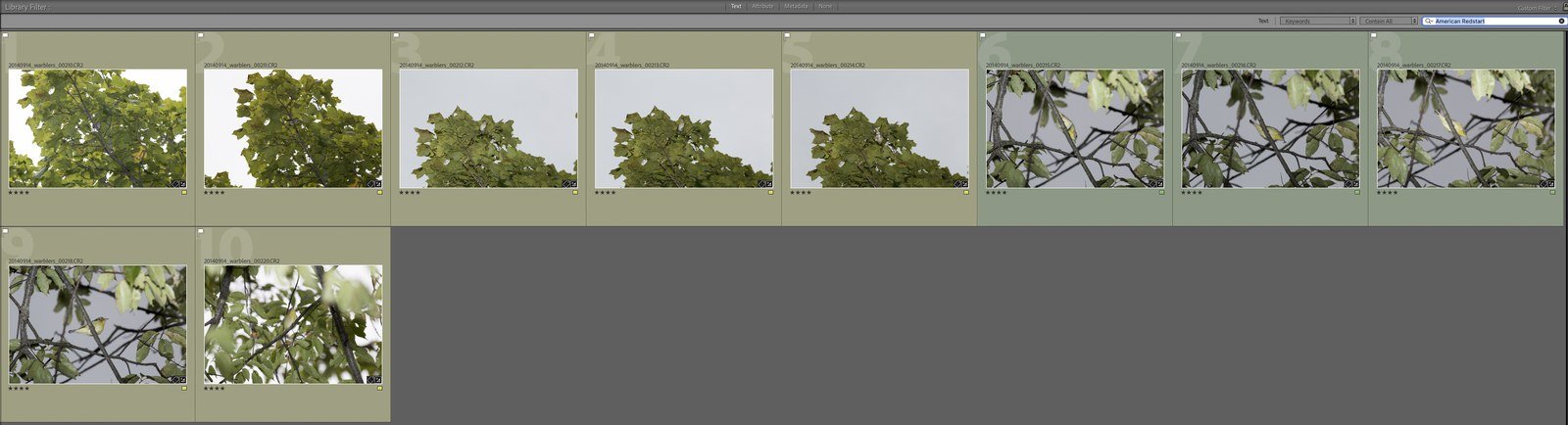
This batch is from September 2014. Fall migration, close to home, and I was still pretty new to birding. I had ten photos keyworded American Redstart. Looking at them now, five are Redstarts and the other five are Philadelphia Vireos.

So, half right.

I don’t remember what happened. Maybe I selected the whole bunch and added the keyword without checking every photo. More likely, I thought I was photographing the same species the whole time. I’d like to blame the keywording, but I’m not sure I get to.

Either way, they sat in my catalog like that for twelve years. They had a name, and I had plenty of other photos to deal with, so I never went back.

Nomen picked up the mistake when I ran those photos through it. For this post, I went back and ran the whole folder again using version 0.15.0, with just the Birds group turned on.

Of those ten photos, it came back with four American Redstarts and five Philadelphia Vireos, all marked Clear match.

The remaining Redstart? It put the detection box around a clump of leaves instead of the bird. Not particularly helpful, but it did flag the result as Check this one. Looking at what was inside that box, fair enough. I couldn’t identify a Redstart from those leaves either.

That’s a useful result for me. It caught five wrong IDs, and the frame where it missed the bird was one it told me to look at.

I’d mostly been thinking about using Nomen to get through the photos I hadn’t identified yet. There are plenty of those. But this has me going back through folders I thought I’d already finished, too.

My birding has improved since 2014. The keywords I put on those photos haven’t. And unless I happen to open an image again and notice something’s off, there’s nothing reminding me that I might have got it wrong.

With more than 100,000 photos, I’m pretty sure these aren’t the only five.

If you want to try this on your own catalog, pick an older folder you think is done and run it through Nomen’s Quick Review. Compare what comes back with the names you already gave the photos. Start with Check this one, but have a look at the others as well. Clear match is still something you can disagree with, and Close call shows you the species that came close behind.

Untick anything you don’t want applied before writing the keywords. Nomen adds its names alongside your existing ones, so you’ll need to remove any incorrect old keywords yourself. In my case, adding Philadelphia Vireo doesn’t make American Redstart disappear.

All of this runs on your computer. The photos stay there, and the matching works without an internet connection.

Anyways, five vireos correctly named. Now to see what else I was confidently wrong about.

Blog

Lump/Split: The Yellow Warbler That Wasn’t

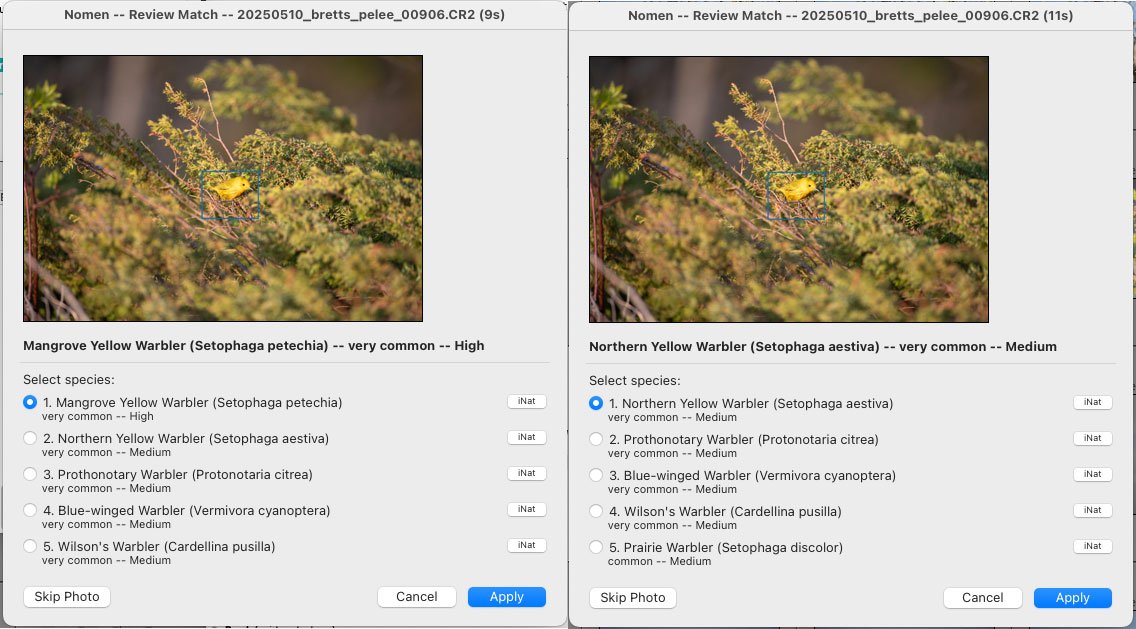
I ran a photo from Pelee through Nomen and it came back Mangrove Yellow Warbler. Confidently. Canada doesn’t have Mangrove Yellow Warblers. It was a regular Yellow Warbler, and Nomen was wrong in the worst possible way: sure of itself.

Here’s what happened.

What is a lump or split?

Taxonomists argue about what counts as a species. Sometimes two populations that look and sound different turn out to be one, so they get “lumped” into a single name. More often these days, the reverse. One species gets “split” into two or more, usually after genetic work shows they stopped interbreeding a long time ago.

Yellow Warbler is a recent split. What used to be one widespread species is now two. Northern Yellow Warbler (the one you see across Canada and most of the US) and Mangrove Yellow Warbler (Central America, the Caribbean, northern South America). They look almost identical in photos, but they don’t share a range.

Why Nomen got it wrong

Nomen uses two kinds of signal to rank species suggestions. Visual similarity: does the bird in your photo look like the reference images for this species? And geographic frequency: is this species actually common where you took the photo?

Both signals broke on the Yellow Warbler split.

Visually, the two birds are basically inseparable in a single frame. The photo can’t tell them apart and neither can the AI.

Geographically, the observation data I was leaning on still filed Canadian Yellow Warbler sightings under the old combined scientific name. So the frequency signal confidently pointed to the wrong species. It wasn’t close. My data said Mangrove Warbler had 1.36 million observations in Canada. It has none.

The fix

Three things changed.

  1. Frequency weighting got turned down. Visual evidence does the heavy lifting; rarity only breaks ties between near-identical species now, and every suggestion shows a rarity label (very common, common, uncommon, rare, not recorded).
  2. I switched the bird-counts source to one that better reflects the new split, and kept the old source for everything that isn’t a bird.
  3. The part that actually fixed Yellow Warbler. I added a species-list filter. For each country, Nomen now pulls a confirmed species list for that region and drops any bird the list doesn’t include. That removed about 46,000 stale post-split entries like Mangrove Warbler in Canada, and added about 10,000 species that had been missing.

The result

Side-by-side Nomen Review Match dialogs. Left: Mangrove Yellow Warbler ranked number one before the fix. Right: Northern Yellow Warbler ranked number one after the fix.

Same photo. Same software. Different data. Mangrove Warbler isn’t even a candidate in Canada anymore, because the regional checklist confirms it doesn’t occur there.

If you’re in the beta and you see a suggestion that’s regionally wrong, flag it in the portal. Most species-level errors I see track back to something like this: a split that left the data behind. That’s what the beta is for.

Blog

Closed Beta, Now on Mac and Windows

Nomen is in closed beta, and as of today it runs on both macOS and Windows.

If you shoot wildlife or nature in Lightroom Classic, here is what it does: select your photos and run Nomen, and it writes species names and keywords straight into your catalog, with a caption ready to post. It knows more than 1.3 million species in 63 species groups, on land and in water. Everything runs on your computer. No photo is uploaded, and matching doesn’t need the internet.

The beta is free. In return I’m asking for honest feedback on what works, what breaks and what’s missing.

What I need most right now: testers across different species groups (not just birds), different regions, and both platforms. Windows is new and needs real-world hours.

Update, October 2026: beta signups are closed. Nomen is launching soon. Leave your email and you’ll get one email when it’s out.